.png)

On average, a user has about 80 apps installed on their phone — but actively uses fewer than 10. The ones that survive? They’ve mastered the art of communicating just enough, at just the right time.
Here’s a stat that should make every product and growth team uncomfortable: 71% of users uninstall apps because of annoying notifications. Not because the app was bad. Not because they found a competitor. Because the app wouldn’t stop talking.
But here’s the flip side: users who receive well-timed messages on a weekly basis show up to 440% higher retention than those who receive none.
The problem was never messaging itself — it’s how much messaging, how often, and where. This is what frequency capping solves. And while most platforms handle it reasonably well for push notifications and email, there’s a massive blind spot: in-app messages.
In this guide, we’ll break down what frequency capping actually is, why it’s non-negotiable for in-app engagement, and a practical framework you can implement today.
What is Frequency Capping?
Frequency capping is the practice of limiting how many times a user sees a specific message — or any message — within a defined time window. It’s the guardrail that prevents your engagement strategy from becoming a spam strategy.
A few important distinctions:
- Frequency capping ≠ rate limiting. Rate limiting is a server-side control on throughput (how many API calls per second). Frequency capping is a user-experience control — it governs what the end user actually sees.
- Frequency capping ≠ targeting. Targeting decides who sees a message. Frequency capping decides how often they see it. You need both.
There are three levels of frequency capping that matter:
- Per-campaign caps: How many times a user sees this specific campaign (e.g., show this promo a maximum of 3 times, ever).
- Session-level / global caps: How many total in-app messages a user sees in a single session, across all campaigns.
- Channel-specific caps: Different limits for different channels — push gets one cap, in-app gets another, email gets another.
Most engagement platforms handle the first and third reasonably well. It’s the second — session-level caps for in-app — where things get complicated.
Why Frequency Capping Matters (More Than You Think)
The fatigue spiral
Message fatigue isn’t gradual. It’s a cliff.
Research consistently shows that 46% of users opt out of messaging after receiving just 2–5 messages per week. By the time you hit 6+ notifications in a week, users are 3.4x more likely to uninstall your app.
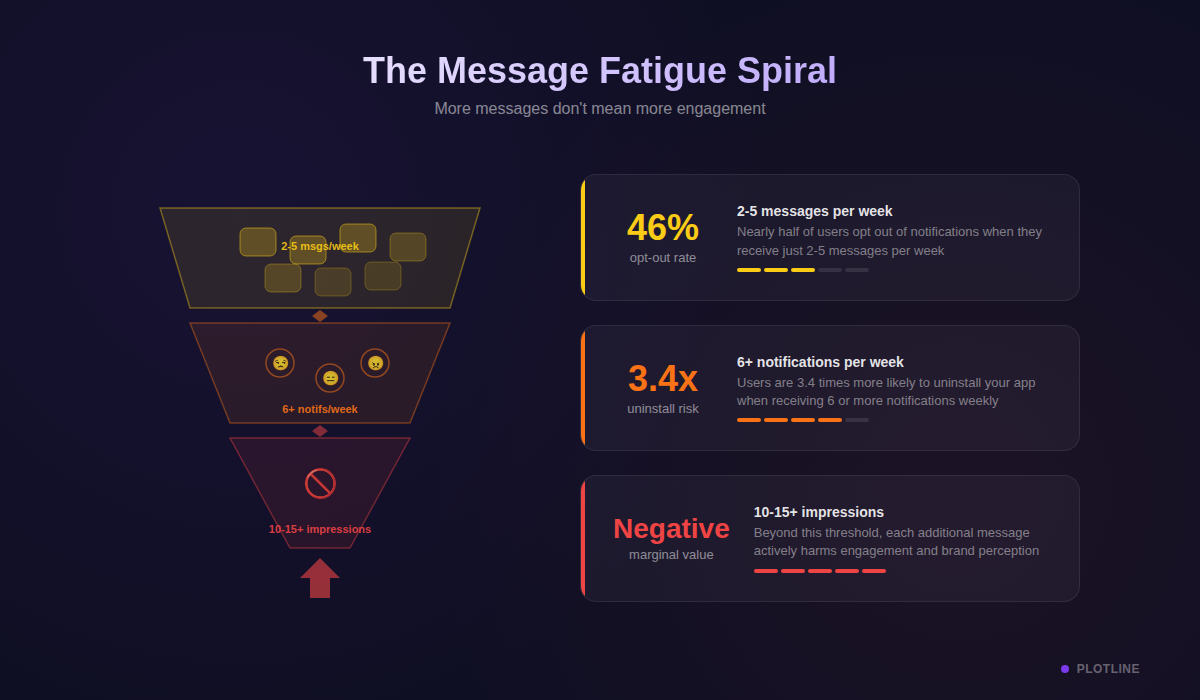
And here’s the kicker: by the 10th–15th impression of the same type of message, the marginal value of each additional impression approaches zero — or goes negative. Your 12th promotional modal isn’t just being ignored. It’s actively making the user like your app less.
Brand perception damage
Constant repetition doesn’t create recall. It creates resentment. Users who feel over-messaged don’t just disengage — they start associating your brand with spam. And that perception, once set, is remarkably hard to reverse.
This is especially dangerous for apps in competitive categories (fintech, e-commerce, food delivery) where switching costs are low. A user who feels pestered by one app will happily try the next one.
The hidden cost: poisoned data
Here’s the cost most teams don’t think about. Over-messaging doesn’t just lose users — it poisons your analytics.
When you’re showing 5 campaigns per session, your engagement rates plummet — not because the campaigns are bad, but because users develop “banner blindness” and start dismissing everything reflexively. Your A/B tests become unreliable. You can’t tell if a campaign underperformed because the creative was weak or because the user was already fatigued from the three messages before it.
Bad frequency discipline makes every other optimization harder.
In-app is uniquely high-stakes
Here’s what makes in-app frequency capping different from push or email: users can’t opt out.
A user can turn off push notifications. They can unsubscribe from email. They can mute an SMS sender. But in-app messages? They’re inescapable while the user is in-session. A full-screen modal demands attention whether the user wants to give it or not.
This makes frequency discipline for in-app messages not just important — it’s existential. Get it wrong, and you’re not just being annoying. You’re degrading the core product experience.
Frequency Capping Across Channels — Where In-App Is Different
For push notifications, email, and SMS, frequency capping is well-understood. Most engagement platforms let you set daily or weekly caps per channel, and there’s plenty of industry data on optimal send frequency. This is largely a solved problem.
In-app is where things get messy.
Most platforms treat “in-app” as a single, monolithic channel. But within in-app, you have wildly different message formats — each with a different level of intrusiveness:
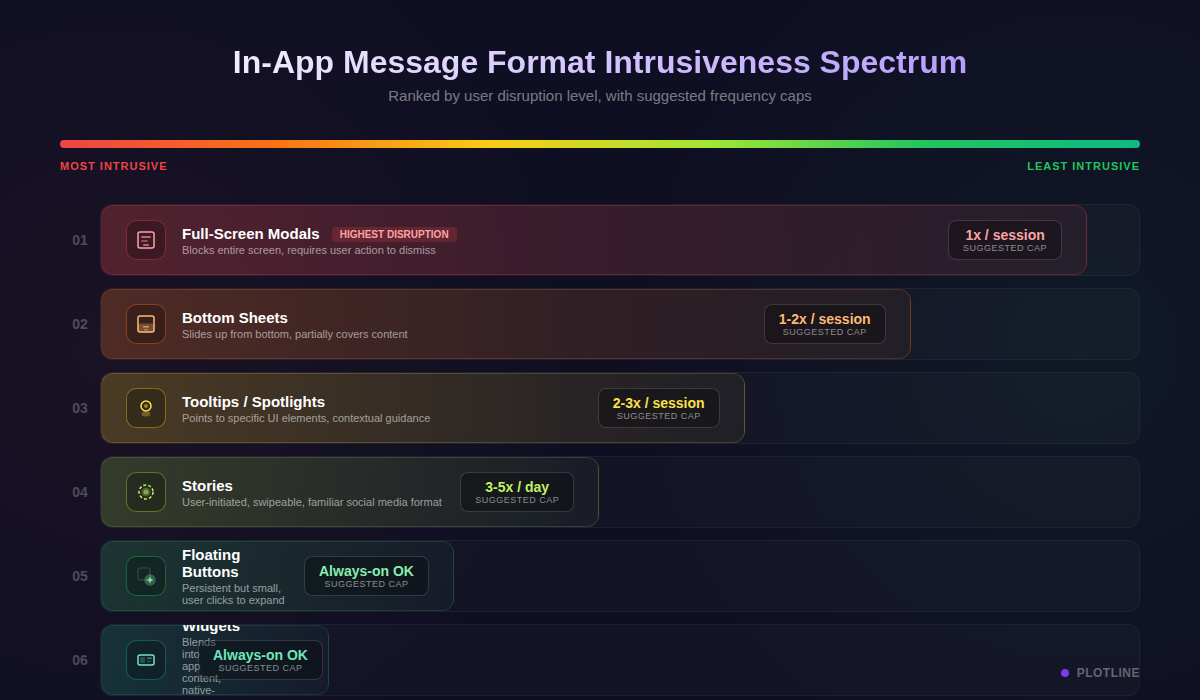
- Full-screen modals demand 100% of the user’s attention. They block interaction until dismissed.
- Bottom sheets slide up and cover part of the screen. Disruptive, but the user can still see context.
- Tooltips and spotlights highlight specific elements. Educational, lower friction.
- Floating buttons sit in the corner and wait to be tapped. Completely passive.
- Stories are user-initiated — the user taps to view, like Instagram.
- Embedded widgets (streaks, reward counters, carousels) are part of the app layout. They don’t “interrupt” at all.
Treating all of these the same — applying one frequency cap across all formats — is like setting the same speed limit on a highway and a school zone. They have fundamentally different levels of disruption, and they need fundamentally different frequency rules.
Session-level thinking
The other dimension most platforms miss is session awareness. Daily and weekly caps make sense for push and email, where you control when the message arrives. But in-app messages fire during active sessions — and users have very different session patterns.
A power user who opens your app 10 times a day has a very different tolerance curve than a casual user who opens it once. A daily cap of “3 in-app messages” means the power user sees 0.3 per session. The casual user sees all 3 in a single sitting. Same cap, completely different experience.
This is why effective in-app frequency capping needs to operate at the session level, not just the daily or weekly level.
How to Set Frequency Caps: A Practical Framework
If you’re looking at a blank frequency cap configuration screen and wondering what numbers to put in, here’s a framework that works.
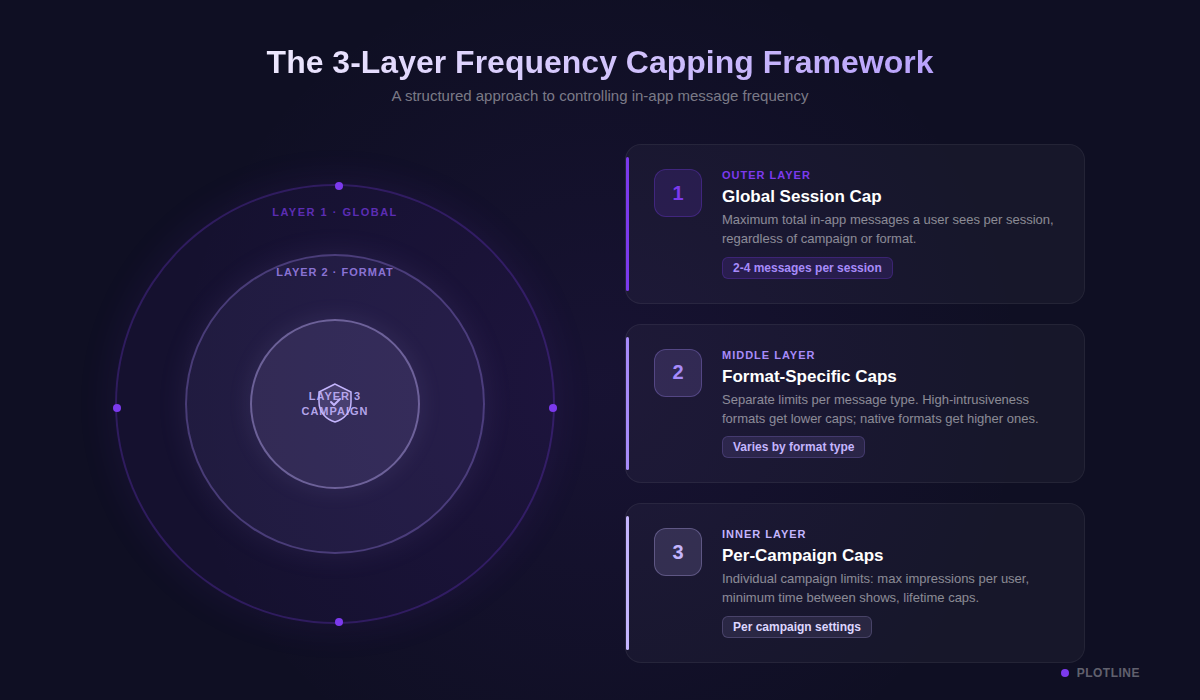
Layer 1: Global session cap
This is your safety net. It limits the total number of in-app messages a user can see in a single session, across all campaigns, all teams, all formats.
Recommended starting point: 2–4 impressions per session.
This forces prioritization. If the session cap is 3, your team has to decide: is the onboarding tooltip more important than the promotional modal? Is the NPS survey more critical than the feature announcement? Without a global cap, every team assumes their message is the most important, and the user gets buried.
Layer 2: Format-specific caps
Within that global cap, set sub-limits based on format intrusiveness:
| Format | Suggested Cap | Why |
|---|---|---|
| Full-screen modals | 1 per session max | Highest disruption. More than one feels aggressive. |
| Bottom sheets | 1–2 per session | Still an overlay, but less jarring than full-screen. |
| Tooltips / spotlights | 2–3 per session (within a guided flow) | Educational, low friction. Users tolerate these more. |
| Floating buttons | No cap needed | Passive — user chooses to engage. |
| Stories | 1 auto-trigger per session | User can explore more on their own after initial trigger. |
| Gamification (spin wheels, scratch cards) | 1 per session | High engagement but novelty wears off fast. |
| Embedded widgets | No cap needed | Part of the layout, not an interruption. |
These aren’t universal truths — they’re starting points. Your optimal numbers will depend on your app’s category, user base, and session length. But they’ll get you in the right ballpark from day one.
Layer 3: Per-campaign caps
This is the most granular level — how many times a specific user sees a specific campaign over its lifetime.
Some common patterns:
- Onboarding flows: 2–3 times total. If the user hasn’t engaged after 3 exposures, the message isn’t working — showing it a 4th time won’t help.
- Promotional offers: Once per day, 3–5 times total. Enough to create awareness without becoming wallpaper.
- Transactional messages (order confirmation, payment success): No cap. These are expected and wanted.
- Feature announcements: Once, with a “Don’t show again” option. Respect the user’s decision.
- NPS / surveys: Once per quarter at most. Survey fatigue is real and kills response quality.
When caps collide: priority rules
Here’s the scenario that trips up most teams: three campaigns all qualify to show at the same time. The user lands on the home screen, and a promotional modal, a feature tooltip, and a gamification popup all want that moment.
The answer is priority-based resolution:
- Transactional > promotional: Payment confirmations and order updates always win.
- Onboarding > re-engagement: New user education takes precedence.
- Time-sensitive > evergreen: A flash sale promo beats a generic feature tip.
And when two campaigns have the same priority level? Add a small delay (2–3 seconds) to the lower-priority one. This lets the first campaign display and dismiss before the second triggers — a simple trick that prevents both from being lost.
Common Mistakes Teams Make
Even teams that implement frequency capping often get it wrong. Here are the patterns we see repeatedly:
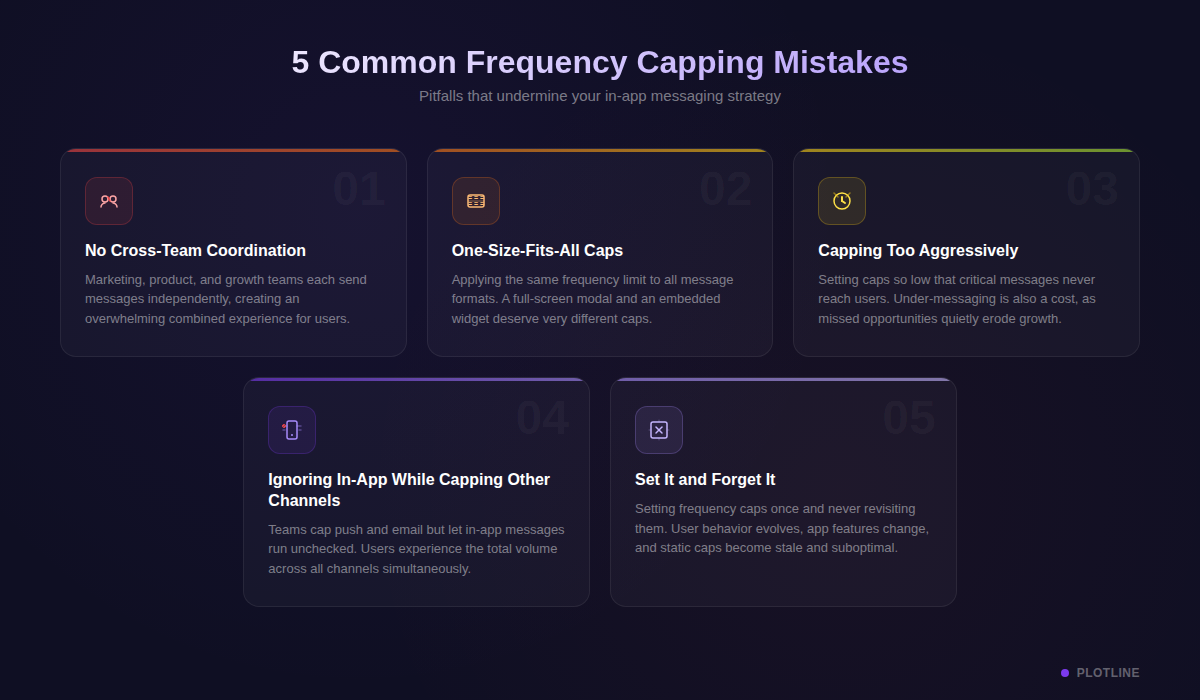
1. No cross-team coordination
Marketing sets nudges. Product sets tooltips. Growth sets modals. Nobody sees the total. The user does.
This is the number one cause of over-messaging, and it’s an organizational problem, not a technical one. Every team independently creates campaigns with reasonable individual frequency caps — but the aggregate experience is unbearable.
The fix: Use a shared campaign calendar and a global session cap that applies across all teams. Better yet, use a platform that enforces session-level limits regardless of who created the campaign.
2. One-size-fits-all caps
Power users and casual users have fundamentally different tolerance levels. A user who opens your app 15 times a day can absorb more messaging than someone who opens it twice a week. Applying the same cap to both wastes opportunity with power users and overwhelms casual ones.
The fix: Segment your users by engagement level and apply tiered caps. At minimum, distinguish between daily-active and weekly-active users.
3. Capping too aggressively
Zero messages = zero engagement. Some teams, burned by over-messaging complaints, swing too far in the other direction and effectively mute their in-app channel. The goal isn’t silence — it’s the right rhythm.
The fix: Start with the framework above (2–4 per session) and use A/B testing to find your specific sweet spot. Track not just impressions, but downstream conversion and retention metrics.
4. Ignoring in-app format differences
Capping push notifications at 2 per day but allowing 5 full-screen modals per session is like putting a speed limit on the highway but not the school zone. In-app modals are more disruptive to the user experience than a push notification they can swipe away.
The fix: Apply format-aware caps using the intrusiveness spectrum above. Modals need tighter limits than tooltips.
5. Not iterating
A frequency cap that worked during your app’s launch phase may not work 6 months later. User behavior changes. Your product changes. Your campaign mix changes. Set-and-forget frequency caps will inevitably drift from optimal.
The fix: Review frequency caps quarterly. Use session-level engagement data to identify whether users are seeing too many or too few messages.
The Future: AI-Driven Frequency Optimization
Static frequency caps are a good starting point — but they’re a blunt instrument. The next evolution is dynamic, per-user frequency optimization powered by AI.
Instead of setting “3 impressions per session” as a universal rule, AI-driven systems learn each user’s ideal messaging rhythm based on their engagement history, session patterns, and response signals. A user who clicks through every tooltip might welcome 4–5 per session. A user who dismisses the first message they see needs a cap of 1.
Early data is promising: brands using AI for frequency optimization see up to 22% better retention and 15% higher click-through rates compared to static caps.
The direction the industry is moving is clear — platforms that learn each user’s ideal frequency, rather than just enforcing a global rule, will win the engagement game.
Key Takeaways
- Frequency capping isn’t about sending less — it’s about sending smarter. The goal is optimal messaging rhythm, not silence.
- In-app messages need format-aware capping. A full-screen modal and a passive floating button require fundamentally different frequency rules.
- Think in sessions, not just days. Session-level caps prevent bombardment for users who open your app frequently.
- Use the 3-layer framework: Global session cap → format-specific limits → per-campaign caps. Start here, measure, and iterate.
- Coordinate across teams. The user doesn’t care which team sent the message. A shared global cap prevents organizational over-messaging.
Getting frequency capping right isn’t just about reducing annoyance — it’s about making every message count. When users trust that your app only speaks when it has something valuable to say, they listen.
Want to see how Plotline handles session-level frequency capping, format-aware limits, and priority-based campaign resolution — all without code? Book a demo with us.